Z Test Calculator
Choose a mean or proportion z test, enter your numbers and get z, the p-value, the decision at α and a confidence interval.
Recent
Your last 10 settings, saved only in this browser. Nothing is uploaded.
How to use the Z test calculator
- Choose one of the four modes: one-sample mean, two means with σ known, one proportion, or two proportions. To start from a typical case, click a preset button above the form.
- For a mean test, type the mean, sample size n and σ. You can also paste raw data lists. Commas, spaces, tabs and new lines all separate values, so a spreadsheet column pastes straight in. The calculator computes the mean and n from the data, but σ must always be typed in.
- For a proportion test, enter the number of successes and the sample size for each group. In the one-proportion mode, also enter p₀, which must be strictly between 0 and 1.
- Choose the tail: two-tailed, right-tailed or left-tailed.
- Set α. It defaults to 0.05, and you can also enter 5 %.
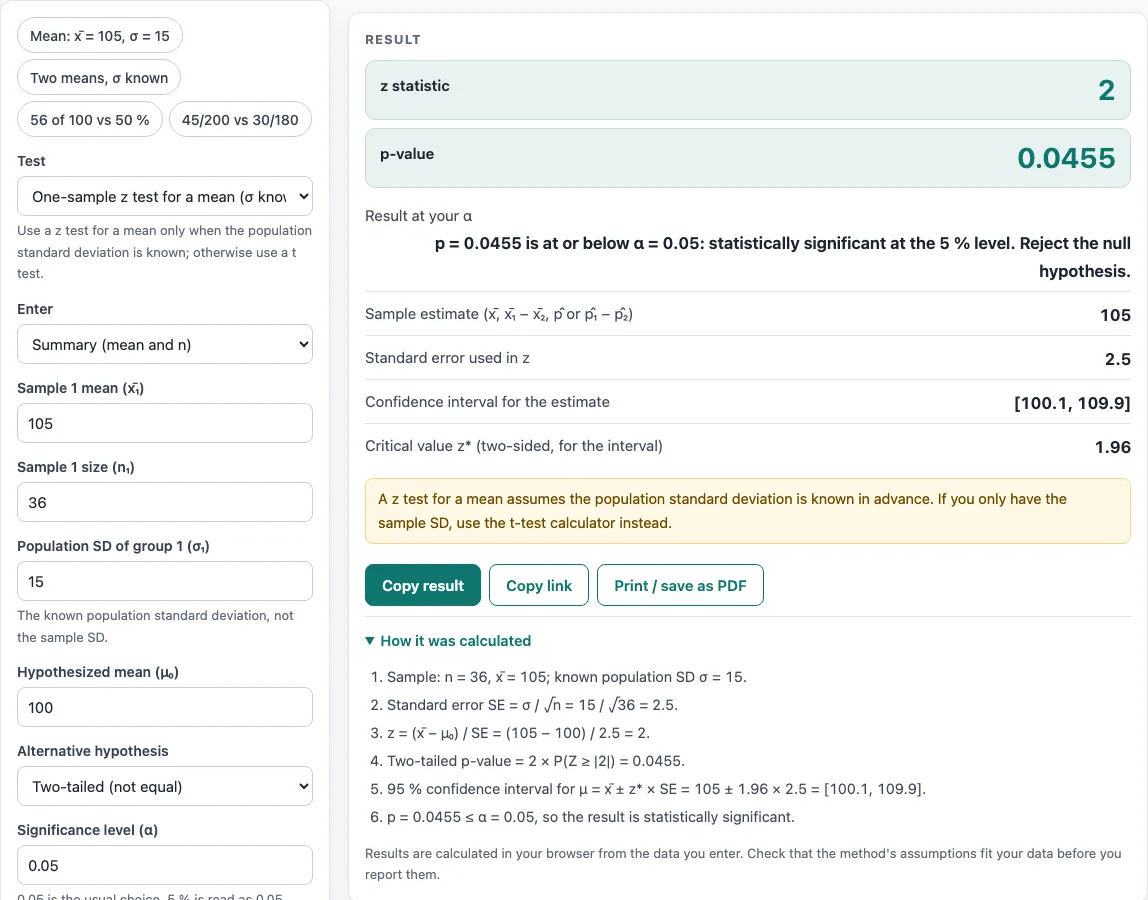
- Read the result: the z statistic, p-value, decision at α, sample estimate, standard error, confidence interval at 1 − α, and critical value z*.
- Read any warnings before you report the result.
- Open “How it was calculated” under the result to see the formula with your values substituted.
Under More options, you can set a hypothesized difference δ₀ for two-mean tests. Below the result, use “Copy result”, “Copy link”, “Print / save as PDF” and “Reset”.
What is a z test?
A z test is a hypothesis test that checks whether a sample mean or proportion differs from a hypothesized value. It uses a z statistic, which measures how many standard errors the estimate sits from that value. For a mean with known population standard deviation σ, z = (x̄ − μ₀)/(σ/√n).
Because the standard error is σ/√n, larger samples give smaller standard errors and more precise tests. When the assumptions hold, z follows the standard normal distribution under the null hypothesis, which is why the p-value is read from the normal curve.
What is an az test?
“AZ test” is almost always a typing mix-up for “z test”, so this page covers the same test. If you meant a different test, the related pages listed below may help.
How do the z statistic and p-value lead to a decision?
First, state a null hypothesis and choose α, usually 0.05. The p-value is the probability, assuming the null hypothesis is true, of a z statistic at least as extreme as the one you observed. A two-tailed test counts both tails, while a right-tailed or left-tailed test counts one. If p is at or below α, the result is significant and you reject the null hypothesis.
For example, 56 successes in 100 tested against p₀ = 0.5 gives z = (0.56 − 0.5)/√(0.5 × 0.5/100) = 1.2. The two-tailed p-value is 0.23014. That is larger than 0.05, so the result is not significant.
For two proportions, the test statistic uses the pooled proportion p̂ = (x₁ + x₂)/(n₁ + n₂). The confidence interval for p₁ − p₂ uses the unpooled standard error instead.
Worked examples
| Input | Result |
|---|---|
| One-sample z test, n = 36, σ = 15, x̄ = 105, μ₀ = 100, Two-tailed (not equal) | z = 2, p = 0.0455, significant at α = 0.05 |
| Two-sample z test, n₁ = 40, n₂ = 50, x̄₁ − x̄₂ = 4, Right-tailed (greater than) | z = 1.725, p = 0.042307, significant at α = 0.05 |
| One-proportion z test, 56 of 100 (p̂ = 0.56) vs p₀ = 0.5, Two-tailed (not equal) | z = 1.2, p = 0.23014, not significant at α = 0.05 |
| One-proportion z test, 8 of 30 (p̂ = 0.2667) vs p₀ = 0.4, Left-tailed (less than) | z = -1.491, p = 0.068019, not significant at α = 0.05 |
| Two-proportion z test, 45/200 vs 30/180, Two-tailed (not equal) | z = 1.427, p = 0.15372, not significant at α = 0.05 |
Calculated by the tool above with these values.
Frequently asked questions
Is the calculator free, and is anything I type uploaded?
Yes, the calculator is free, and it needs no account or sign-up. Everything is calculated in your browser, so nothing you type is uploaded. Results may be used in any work, including commercial reports, theses and client projects, without attribution.
Can I print or share a calculation?
Yes. “Print / save as PDF” creates a one-page record with the inputs, results, calculation steps and date. “Copy link” copies a page address that stores every input, so the same calculation reopens later or can be sent to a colleague.
When should I use a t test instead?
Use a t test when σ is not known. The mean modes always show a warning about this. The t test calculator covers that case.
Why does the calculator warn about 10 successes or failures?
Proportion modes warn when you expect fewer than 10 successes or fewer than 10 failures, either under p₀ or under the pooled proportion. The normal approximation behind the z test becomes unreliable with small expected counts. The rule of 10 is a common guideline, as set out in OpenIntro Statistics.
Can I use the z test with raw data?
Yes, in the two mean modes you can paste the raw values instead of typing the mean and n; the calculator works them out. You still type σ, because a z test needs the population standard deviation from outside the sample.
Related tools
- T test calculator: use it when the population standard deviation is unknown.
- T test vs z test: read it to decide which of the two tests fits your data.
- P-value calculator: use it to convert a test statistic into a p-value.
- Critical value calculator: use it to find the cutoff z* for your α and tail.
- Confidence interval calculator: use it to build an interval around an estimate.
- Which statistical test to use: use it when you are not sure which test applies.
- Effect size calculator: use it to measure how large a difference is, not just whether it is significant.