Weighted Mean Calculator
Enter values and their weights to get the weighted mean, the plain mean for comparison, and each row's contribution, with the working shown.
Recent
Your last 10 settings, saved only in this browser. Nothing is uploaded.
The weighted mean calculator works out an average in which each value counts according to its weight. You enter values and their weights, and the tool divides the sum of weight times value by the sum of the weights. It runs free in your browser, so the numbers you enter are not uploaded anywhere.
A weighted mean suits cases where some values matter more than others, such as course grades where exams count for more than homework, or GPAs where courses carry different credit hours. The result sits beside a plain unweighted mean, so you can see how much the weights change the answer.
How to use the Weighted mean calculator
- Find the Values and weights box.
- Enter one pair per line, with the value first and its weight second, separated by a comma, tab or space. For example,
88, 20means a score of 88 with a weight of 20. - If you want table headings, put two column names on the first line, such as
Score, Weight. - If your data is in two labelled lists, type them as
x: …for the values andy: …for the weights. You can also paste a two-column spreadsheet range directly. - To start from an example, click one of the four preset chips: Course grade, Equal weights, GPA by credits or Exam 40/30/30.
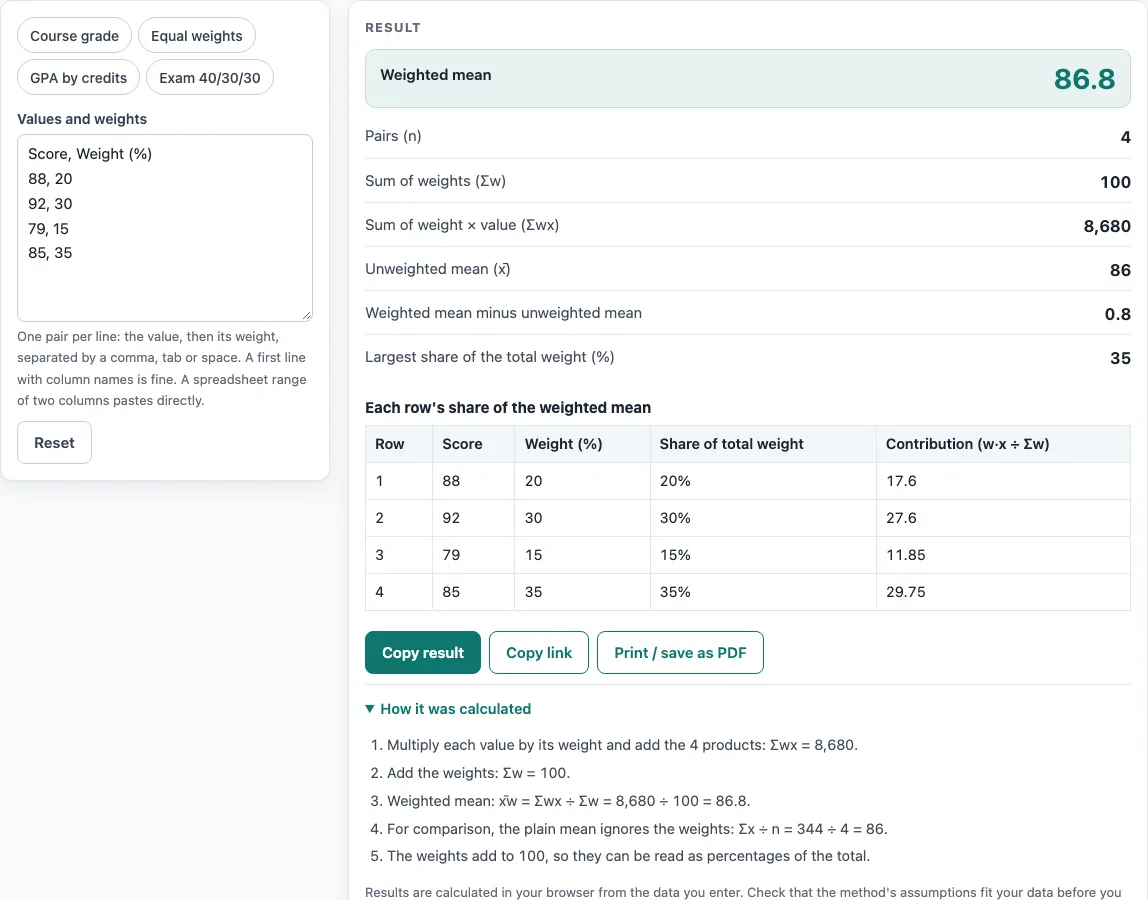
- Read Weighted mean in the result. The steps list below it writes out Σwx, Σw and the division, so you can check the working.
- Scroll to the table. It shows each row’s value, weight, share of total weight (%) and contribution, and the contributions add up to the weighted mean.
- Read any warning before you use the result, such as a row with weight 0 or one row that carries almost all of the weight, because either can make the mean look different from what you expected.
Copy link stores your inputs in the page address, so you can send the same calculation to someone else. Print / save as PDF prints the result.
How do I calculate a weighted mean?
A weighted mean multiplies each value by its weight, adds those products together, and divides by the sum of the weights. In symbols, the weighted mean is Σ(w·x) ÷ Σw. Using the Course grade preset, the values 88, 92, 79 and 85 have weights 20, 30, 15 and 35. The products add to 8,680, and the weights add to 100, so 8,680 ÷ 100 gives 86.8.
What is the difference between a weighted mean and a plain mean?
A plain mean gives every value the same influence, so it is the sum of the values divided by how many there are. A weighted mean lets some values count more than others. For the same four scores, the plain mean is 86, but the weighted mean is 86.8, because the 92 carries weight 30 and the 79 carries only 15. The gap between the two is shown in the Weighted mean minus unweighted mean row.
Do the weights have to add up to 100 or 1?
No. The formula divides by Σw, so only the ratios between the weights matter. The weights 20, 30, 15 and 35 give the same mean as 0.2, 0.3, 0.15 and 0.35, and multiplying every weight by 10 changes nothing. When the weights happen to add to 100, the tool notes that they can be read as percentages. The Equal weights preset uses a weight of 1 for every row, and 70, 80 and 90 give 80.
How do I calculate a weighted grade or GPA?
For a grade, multiply each score by its weight, add the results, and divide by the total weight. The Exam 40/30/30 preset shows this: 95 × 40 + 60 × 30 + 75 × 30 = 7,850, and 7,850 ÷ 100 gives 78.5. For a GPA, the values are grade points and the weights are credit hours. The GPA by credits preset uses grade points 3.7, 3.0, 4.0 and 2.3 with credits 3, 4, 2 and 1. The total is 33.4 grade-point-credits over 10 credits, giving 3.34.
Can a weight be zero or negative?
A weight can be zero but not negative. A row with weight 0 still counts toward n, but it adds nothing to the mean, and the tool shows a warning about it. A negative weight stops the calculation, and the error names the row. Weights that add to zero also cause an error, because the mean cannot be found when you would be dividing by zero.
Worked examples
| Input | Result |
|---|---|
| 4 pairs, first line: Score, Weight (%) | Weighted mean 86.8 (plain mean 86) |
| 3 pairs, first line: 70, 1 | Weighted mean 80 (plain mean 80) |
| 4 pairs, first line: x: 3.5 4.0 2.0 3.0 | Weighted mean 3.16667 (plain mean 3.125) |
| 3 pairs, first line: 95, 40 | Weighted mean 78.5 (plain mean 76.6667) |
| 3 pairs, first line: 12, 0.5 | Weighted mean 18.1667 (plain mean 18.3333) |
Calculated by the tool above with these values.
Frequently asked questions
How many rows can I enter?
You can enter up to 20,000 rows. The table below the result shows up to 25 rows, but the totals and the weighted mean cover every row you entered.
Is a weighted average calculator the same thing?
Yes. A weighted average calculator does the same job as this weighted mean calculator. Both compute Σ(w·x) ÷ Σw from the pairs you enter.
Is my data uploaded anywhere?
No. Nothing is uploaded, so the values and weights you type stay with you.
What does the warning about one row carrying more than 90% mean?
It means that row makes up more than 90% of the total weight, so the weighted mean will be almost the same as that row’s value. Check the Largest share of the total weight (%) row if you expected the weights to be more balanced.
What do Σwx and Σw stand for?
Σwx is the sum of each weight multiplied by its value. Σw is the sum of all the weights. The steps list shows both, followed by the division that gives the weighted mean.
Will the result match my school’s grade report?
Only if the weights and grade points you enter follow the same rules your school uses. The tool does not know any school’s grading rules; it only does the arithmetic on what you enter.
Related tools
- Standard deviation calculator: use it to measure how spread out your values are around their mean.
- Mean, median and mode calculator: use it when every value should count equally and you want the typical value in other ways too.
- Box and whisker plot calculator: use it to see the spread and quartiles of a data set in a chart.
- Statistics calculator: use it when you need several basic statistics for the same data set.
- Percentile calculator: use it to see where one value sits in a data set.
- Linear regression calculator: use it to fit a line through paired data.
- Sample size calculator: use it to plan how many observations you need.