Sum of Squares Calculator
Paste a list of numbers to get the sum of squared deviations from the mean, the raw sum of squares or the sum about a value you pick, with the working.
Recent
Your last 10 settings, saved only in this browser. Nothing is uploaded.
This sum of squares calculator adds up squared values for a list of numbers in three ways: the squared deviations from the mean, Σ(x − x̄)², which is the “SS” used in variance, regression and ANOVA; the raw sum of squares, Σx²; and the squared deviations from any value you choose. Paste your numbers and the result updates as you type, together with the count, the sum, the mean and the sample and population variance that follow from the same total.
Every result comes with the calculation written out, and with a table of each value, its deviation and its square when you enter up to 20 values. It runs in your browser, is free, and needs no account or sign-up. Nothing you paste is uploaded.
How to use the sum of squares calculator
- Type or paste your numbers into the box. Commas, spaces, semicolons, tabs and new lines all separate values, so a spreadsheet column pastes straight in. The limit is 50,000 values.
- Under Sum of squares of, keep Deviations from the mean for the usual SS, choose The values themselves for Σx², or choose Deviations from a value I choose and type that value as c.
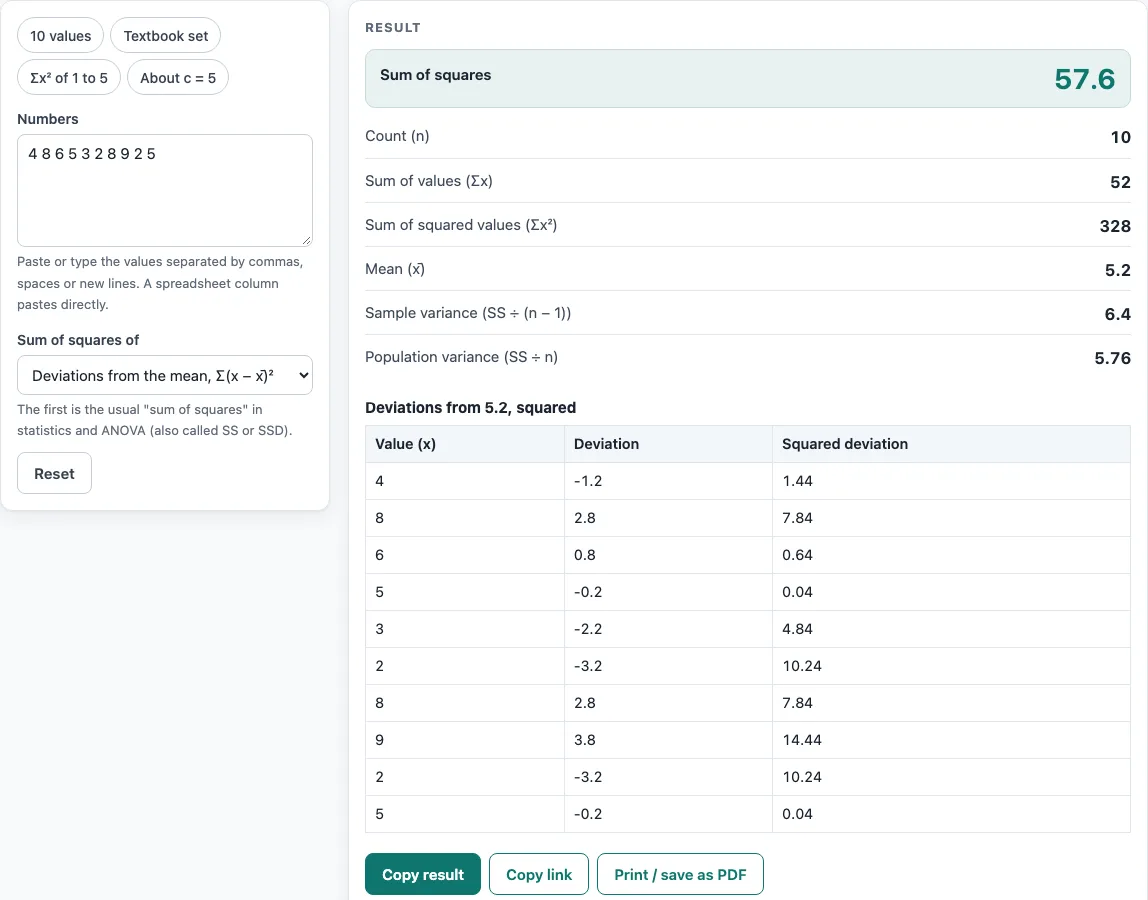
- Read the large result: the sum of squares for the option you picked. Below it you will see n, Σx, Σx², the mean and the sample and population variance.
- Open the steps to see the mean, the squared deviations added up, and the shortcut check Σx² − (Σx)² ÷ n.
- With 20 values or fewer, the table under the result lists every value, its deviation and its squared deviation, so you can compare with a hand calculation.
- Preset buttons load typical cases: 10 values, Textbook set, Σx² of 1 to 5 and About c = 5. Reset returns to the starting example, and the result is recalculated each time you change a value.
Copy result copies the result lines with a link, Copy link stores every input in the page address, and Print / save as PDF produces a one-page record with the inputs, results, steps and date.
Sum of squares formula
The sum of squares about the mean is SS = Σ(xᵢ − x̄)². Subtract the mean from every value, square each difference so negative and positive deviations do not cancel, and add the squares. Dividing SS by n − 1 gives the sample variance, and dividing by n gives the population variance; the square root of either is the standard deviation.
There is an equivalent shortcut: SS = Σx² − (Σx)² ÷ n. It needs only the sum of the values and the sum of their squares, which is why it appears in hand-calculation methods. The calculator shows both so you can check one against the other.
How to calculate sum of squares
Take the values 4, 8, 6, 5, 3, 2, 8, 9, 2 and 5.
- Add them: Σx = 52, and n = 10, so the mean is 52 ÷ 10 = 5.2.
- Subtract 5.2 from each value and square the result.
- Add the squares: SS = 57.6.
- Check with the shortcut: Σx² = 328, and 328 − 52² ÷ 10 = 328 − 270.4 = 57.6.
- Divide for the variance: 57.6 ÷ 9 = 6.4 for a sample, 57.6 ÷ 10 = 5.76 for a population.
Corrected, raw and total sum of squares
The raw sum of squares Σx² (called uncorrected in some books) squares the values themselves, so it grows with the size of the numbers as well as with their spread. The sum about the mean is called the corrected sum of squares, and when it is taken over all observations it is often called the total sum of squares. The NIST/SEMATECH e-Handbook uses the names “raw sum of squares” and “corrected sum of squares”. Note that books disagree on abbreviations: NIST writes SST for the sum of squares of treatments, while many textbooks write SST for the total.
Measuring from a value c other than the mean always gives a larger total: Σ(x − c)² = SS + n(x̄ − c)². For the values 1, 2, 3, 4, 5 the sum about the mean 3 is 10, and about c = 5 it is 10 + 5 × (3 − 5)² = 30. That is why the mean is the point that makes the sum of squares smallest.
Sum of squares in ANOVA and regression
In one-way ANOVA the total sum of squares splits into a part between groups and a part within groups: SS total = SS between + SS within. For the two groups 3, 5, 7 and 6, 8, 10 the total about the overall mean 6.5 is 29.5, the within-group sums are 8 and 8 (16 in all) and the between-group part is 3 × (5 − 6.5)² + 3 × (8 − 6.5)² = 13.5, and 13.5 + 16 = 29.5. Paste all six values here to get the total, or use the ANOVA calculator for the full table with the F statistic and p-value. In regression the same idea gives total = explained + residual; the linear regression calculator reports the fit.
Worked examples
| Input | Result |
|---|---|
| 10 values, about the mean | Sum of squares 57.6 |
| 8 values, about the mean | Sum of squares 32 |
| 5 values, Σx² | Sum of squares 55 |
| 5 values, about c = 5 | Sum of squares 30 |
| 4 values, about the mean | Sum of squares 3.05 |
Calculated by the tool above with these values.
Frequently asked questions
Is the sum of squares the same as the variance?
No. The variance is the sum of squares divided by n − 1 (sample) or n (population). The sum of squares is the total; the variance is that total per degree of freedom.
Which option should I choose?
Use Deviations from the mean for the sum of squares in statistics, ANOVA and regression. Use The values themselves for Σx², for example in the shortcut formula or a least-squares sum. Use Deviations from a value I choose when you measure error against a target or reference value.
Can the sum of squares be negative?
No. Every term is a square, so the total is zero or positive. It is zero only when the quantity being squared is zero for every value, for example when all values are equal to the mean.
How is the sum of squares different from the square of the sum?
The sum of squares adds the squared values, Σx². The square of the sum adds the values first and then squares, (Σx)². For 1, 2, 3, 4, 5 these are 55 and 225. The shortcut formula uses both: SS = Σx² − (Σx)² ÷ n = 55 − 225 ÷ 5 = 10.
Is the calculator free, and is anything I type uploaded?
Yes, it is free. Everything is calculated in your browser, so nothing you type is uploaded, and there is no account or sign-up.
Can I print or share a calculation?
Yes. Print / save as PDF gives a one-page record with the inputs, results, steps and date. Copy link stores your inputs in the page address, so the same calculation can be reopened later or sent to a colleague.
Sources: NIST/SEMATECH e-Handbook of Statistical Methods, 1.3.5.6 Measures of Scale and 7.4.3.1 One-way ANOVA overview.
Related tools
- Standard deviation calculator when you want the SD, the square root of SS divided by n − 1 or n.
- Statistics calculator for the full set of summary statistics for one data set.
- Mean, median and mode calculator for the centre that the deviations are measured from.
- ANOVA calculator for between-group and within-group sums of squares with the F test.
- Linear regression calculator for the explained and residual parts of a fitted line.
- Relative standard deviation calculator for the SD as a percentage of the mean.