Relative Standard Deviation Calculator (%RSD)
Paste replicate measurements, or type a mean and standard deviation, to get the percent relative standard deviation with the working.
Recent
Your last 10 settings, saved only in this browser. Nothing is uploaded.
Relative standard deviation (RSD) is the standard deviation divided by the absolute value of the mean, multiplied by 100 and shown as a percent. This relative standard deviation calculator gives the %RSD for a list of numbers or for a mean and standard deviation you already have.
Paste your replicate measurements, choose sample or population, and the result updates as you type. Each result shows the mean, the standard deviation, the ratio as a plain fraction and the calculation steps, so you can check the working. The same tool works as an RSD calculator online, a percent RSD calculator or a percent deviation calculator, since all of these names refer to the same formula. It runs in your browser, is free, and needs no account or sign-up.
How to use the relative standard deviation calculator
- Choose a mode from the first select: “A list of numbers (replicates)” or “A mean and a standard deviation I already have”.
- In list mode, type or paste your values into the box. Commas, spaces, semicolons, tabs and new lines all separate values, and you can paste a spreadsheet column directly. The limit is 50,000 values.
- In list mode, open the select and pick sample (divides by n − 1, the default) or population (divides by n).
- In direct mode, type the mean and the standard deviation as numbers. The standard deviation cannot be negative.
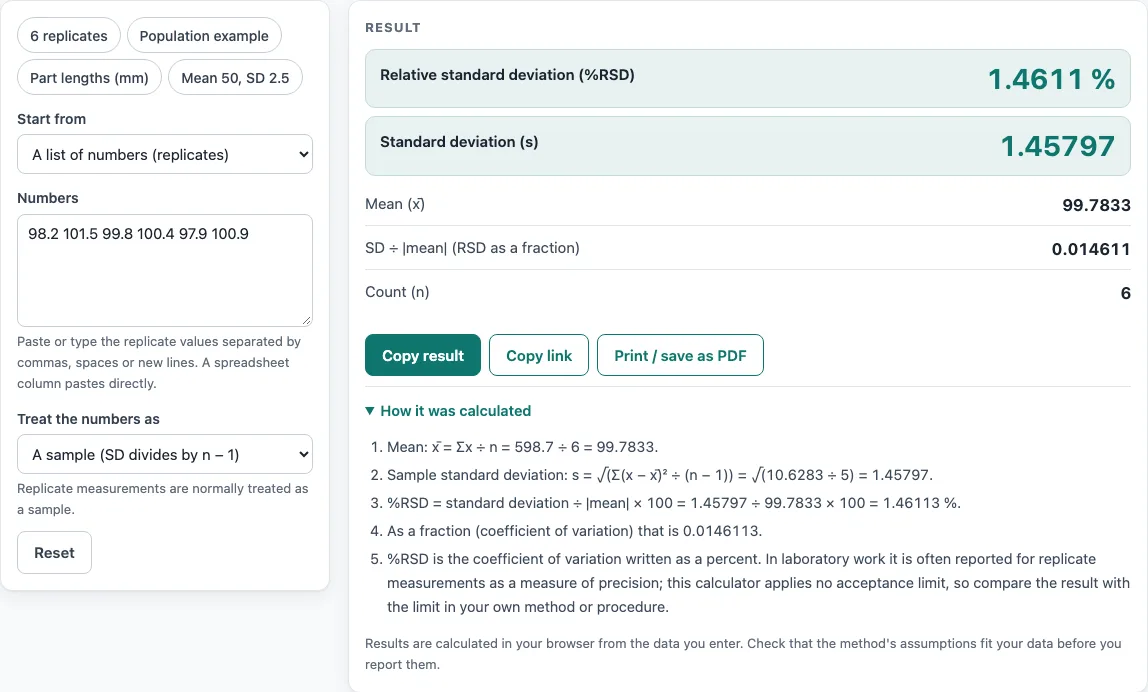
- Read the %RSD in the large figure. Below it you will see the standard deviation, the mean, the ratio SD ÷ |mean| as a plain fraction, and n (list mode only).
- Open the steps to see the mean, the standard deviation formula with your numbers, the %RSD calculation and the same value as a fraction. Read any warning above the result before you use the figure.
- To try a typical case, press a preset button: “6 replicates”, “Population example”, “Part lengths (mm)” or “Mean 50, SD 2.5”.
- Press Reset to return to the starting example.
Copy result copies the result lines with a link, Copy link stores every input in the page address, and Print / save as PDF produces a one-page record with the inputs, results, steps and date.
How to calculate relative standard deviation
Relative standard deviation is the standard deviation divided by the absolute value of the mean, then multiplied by 100. The result is a percentage that shows how large the spread is compared with the size of the mean. It equals the coefficient of variation written as a percent.
The formula is %RSD = 100 × s ÷ |x̄|, where s is the standard deviation and x̄ is the mean. The bars around the mean mean its absolute value, so a negative mean still gives a positive result.
For a list of n values, the standard deviation divides the sum of squared deviations by n − 1 for a sample, or by n for a population. Use sample when your values are a subset of a larger group, which is the usual case for replicate measurements. Use population only when the list contains every value in the group you are describing.
Take the values 98.2, 101.5, 99.8, 100.4, 97.9 and 100.9. As a sample, the mean is 99.7833, the standard deviation s is 1.45797, and %RSD = 100 × 1.45797 ÷ 99.7833 = 1.46113 %. Treated as a population, the same values give 1.33383 %.
How to calculate RSD
Work through RSD in four steps:
- Find the mean of the values.
- Subtract the mean from each value, square the differences, add them up, and divide by n − 1 (sample) or n (population). Take the square root to get s.
- Divide s by the absolute value of the mean.
- Multiply by 100.
With a mean of 50 and an SD of 2.5, %RSD = 2.5 ÷ 50 × 100 = 5 %.
In laboratory work, %RSD of replicate measurements is commonly reported as a measure of precision. This calculator applies no acceptance limit, so whether a value is acceptable depends on your method and rules. The tool gives warnings in these cases:
- If the mean is zero, %RSD is undefined, the result is blank and a warning says so.
- If the values include both negative and positive numbers, the mean can be near zero, so RSD is not a useful spread measure.
- If the mean is negative, the absolute value is used and the result is shown as a positive percentage.
- If %RSD is above 100 %, the SD is larger than the mean, and RSD is unstable when the mean is close to zero.
The formula follows NIST/SEMATECH e-Handbook of Statistical Methods, section 1.3.5.6, and the IUPAC Gold Book entry for relative standard deviation.
Worked examples
| Input | Result |
|---|---|
| 6 values, sample | %RSD 1.461 % (SD 1.458, mean 99.78) |
| 8 values, population | %RSD 40 % (SD 2, mean 5) |
| 10 values, sample | %RSD 1.163 % (SD 0.1197, mean 10.29) |
| mean 50, SD 2.5 | %RSD 5 % (SD 2.5, mean 50) |
| mean 120.4, SD 9.6 | %RSD 7.973 % (SD 9.6, mean 120.4) |
Calculated by the tool above with these values.
Frequently asked questions
Is the calculator free, and is anything I type uploaded?
Yes, it is free. Everything is calculated in your browser, so nothing you type is uploaded, and there is no account or sign-up.
Can I print or share a calculation?
Yes. Print / save as PDF gives a one-page record with the inputs, results, calculation steps and date. Copy link stores your inputs in the page address, so the same calculation can be reopened later or sent to a colleague.
How do I calculate deviation percentage?
In this context, deviation percentage means RSD. Divide the standard deviation by the absolute value of the mean, then multiply by 100. For a mean of 50 and an SD of 2.5, the result is 5 %.
What does the calculator show if the mean is zero?
The %RSD is undefined, so the result field is left blank and a warning explains why. You can still check the values and the mean in the result panel.
Should I choose sample or population?
Sample divides by n − 1 and is the default. Choose population only when the list contains every value in the group you are describing. For the six-value example above, sample gives 1.46113 % and population gives 1.33383 %.
Is there an acceptable RSD value?
The calculator does not set one, so it applies no acceptance limit. Your method, lab procedure or client rules decide what counts as acceptable. Check that the assumptions fit your data before you report the result.
Related tools
- Statistics calculator for working through several summary statistics on the same data set.
- Standard deviation calculator when you need the SD on its own, before dividing by the mean.
- Mean, median and mode calculator when you need the mean or the central values that feed into RSD.
- Box and whisker plot calculator when you want to see the spread and outliers in your values visually.
- Percentile calculator when you need to know where a particular value sits within your list.
- Confidence interval calculator when you want a range for the mean rather than a measure of spread.