Mean Median Mode Calculator
Paste a list of numbers to get the mean, median, mode and range, with the sorted list, a frequency table and the working.
Recent
Your last 10 settings, saved only in this browser. Nothing is uploaded.
How to use the mean median mode calculator
- Enter your numbers in the box. Commas, spaces, semicolons, tabs and new lines all work as separators, so a spreadsheet column pastes straight in.
- Alternatively, choose a preset above the form (11 numbers, Even count (1 2 3 4), Two modes or 12 test scores) to load a typical case.
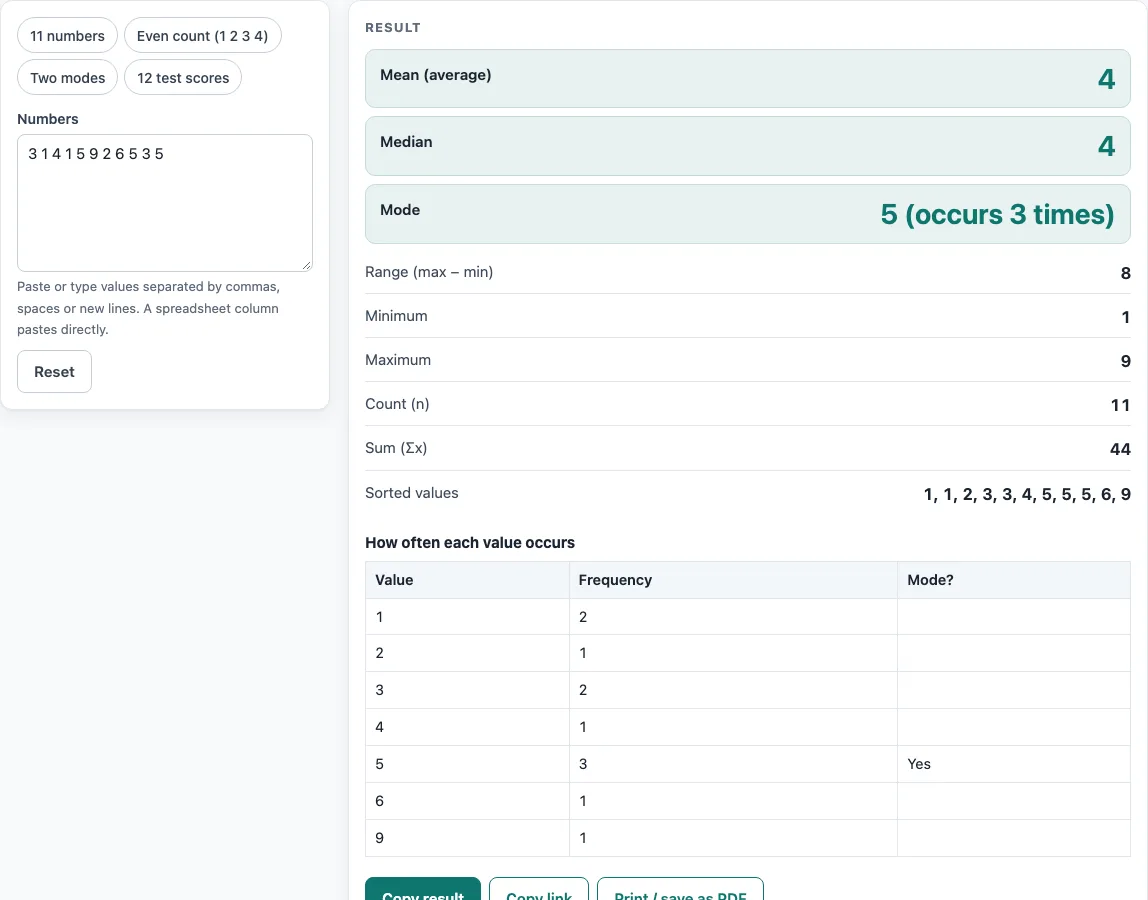
- Look at the three large results: mean, median and mode. They refresh as you type, so no button needs pressing.
- Underneath, review the range, minimum, maximum, count n, sum and the sorted list (the first 100 values are shown when the list is longer).
- Expand How it was calculated to see the sum divided by n, the sorted list with the middle position marked, the most frequent value and the range.
- The frequency table shows how often each distinct value occurs and which values are modes (first 50 distinct values).
Copy result copies the results with a link, Copy link stores your numbers in the page address so the same list reopens later, Print / save as PDF gives a one-page record with the steps and date, and Reset restores the starting example.
Example: 3 1 4 1 5 9 2 6 5 3 5 gives n = 11, sum 44, mean 4, median 4, mode 5 (three times) and range 8.
Starting from that example, the page loads with those values already filled in.
Formula for mean, median and mode (and range)
- Mean (the average) = Σx ÷ n: sum the values, then divide by how many values there are.
- Median = the middle value of the sorted list. An odd count gives one middle value; an even count gives the average of the two middle values.
- Mode = the value that occurs most often. When several values share the highest count, every one of them is a mode; when each value occurs exactly once, the list has no mode.
- Range = largest value − smallest value.
Calculating mean and median for an even count
Sort 5 3 8 3 8 1 to 1 3 3 5 8 8. Six values means the median is the average of the third and fourth: (3 + 5) ÷ 2 = 4. The mean works out to 28 ÷ 6 = 4.66667, the range is 8 − 1 = 7, and the data have two modes, 3 and 8, each occurring twice. For 1 2 3 4 the mean and median are both 2.5, the range is 3 and no mode exists.
Mean, median or mode: which one to report?
The mean uses every value, so one very large or very small value can drag it off course. The median depends only on the middle of the sorted list, which makes it resistant to outliers, and that’s why incomes and house prices are usually reported as medians. Of the three, only the mode also works for categories, and it points to the most typical exact value. When the three are close, the data are roughly symmetric; when the mean sits well above the median, the data are skewed to the right.
Worked examples
| Input | Result |
|---|---|
| 11 values from 1 to 9 | mean 4, median 4, mode: 5 (occurs 3 times), range 8 |
| 4 values from 1 to 4 | mean 2.5, median 2.5, mode: No mode (every value occurs once), range 3 |
| 6 values from 1 to 8 | mean 4.667, median 4, mode: 3, 8 (each occurs 2 times), range 7 |
| 12 values from 64 to 95 | mean 83.33, median 86.5, mode: 91 (occurs 3 times), range 31 |
| 7 values from 9.8 to 14.1 | mean 12.07, median 12.5, mode: No mode (every value occurs once), range 4.3 |
Calculated by the tool above with these values.
Frequently asked questions
What does “No mode (every value occurs once)” mean?
No value appears more often than any other, so the list has no mode. The calculator follows the usual textbook convention for this case rather than listing every value as a mode.
Can a list have two modes?
Yes. When two or more values tie for the highest frequency, all are listed and a warning says how many modes there are; 5 3 8 3 8 1 has the modes 3 and 8.
Do 10.0 and 10 count as the same value?
Yes. Modes are found by exact equality of the numbers, so 10.0 and 10 are the same value.
What happens if I enter only one value?
The mean and median equal that value, the range is 0 and there is no mode; a warning explains both points.
Is the calculator free, and is anything I type uploaded?
It is free, needs no account, and everything is calculated in your browser; nothing you type is uploaded.
Can I use the results in a report or assignment?
Yes, in any work including commercial reports and theses, without attribution. Print / save as PDF gives a record of the inputs, results and steps that a teacher or reviewer can check.
How do I find the median of an even number of values?
Sort the values and average the two in the middle; the steps show which two positions were used.
Related tools
- Statistics calculator — every summary statistic for one data set.
- Standard deviation calculator — how far the values spread around the mean.
- Box and whisker plot calculator — median, quartiles and outliers as a plot.
- Percentile calculator — any percentile or the rank of a value.
- Relative standard deviation calculator — spread as a percentage of the mean.
- Confidence interval calculator — a range for the true mean.