Growth Rate Formula Calculator
Enter a start value and an end value to get the growth rate, or work out the end value, start value or number of periods, with the working shown.
Recent
Your last 10 settings, saved only in this browser. Nothing is uploaded.
The growth rate calculator finds how fast a value changes from one period to the next. Enter the values you know and it works out the rest with the growth rate formula, including the compound growth rate per period. It runs entirely in your browser, so nothing you type is uploaded. It is free and needs no sign-up.
The tool covers four directions: growth rate, end value, start value and number of periods. Each result comes with the simple and compound growth rates, the time to double and a period-by-period table. Negative rates are allowed, so you can also use it for values that fall over time, such as falling sales or revenue.
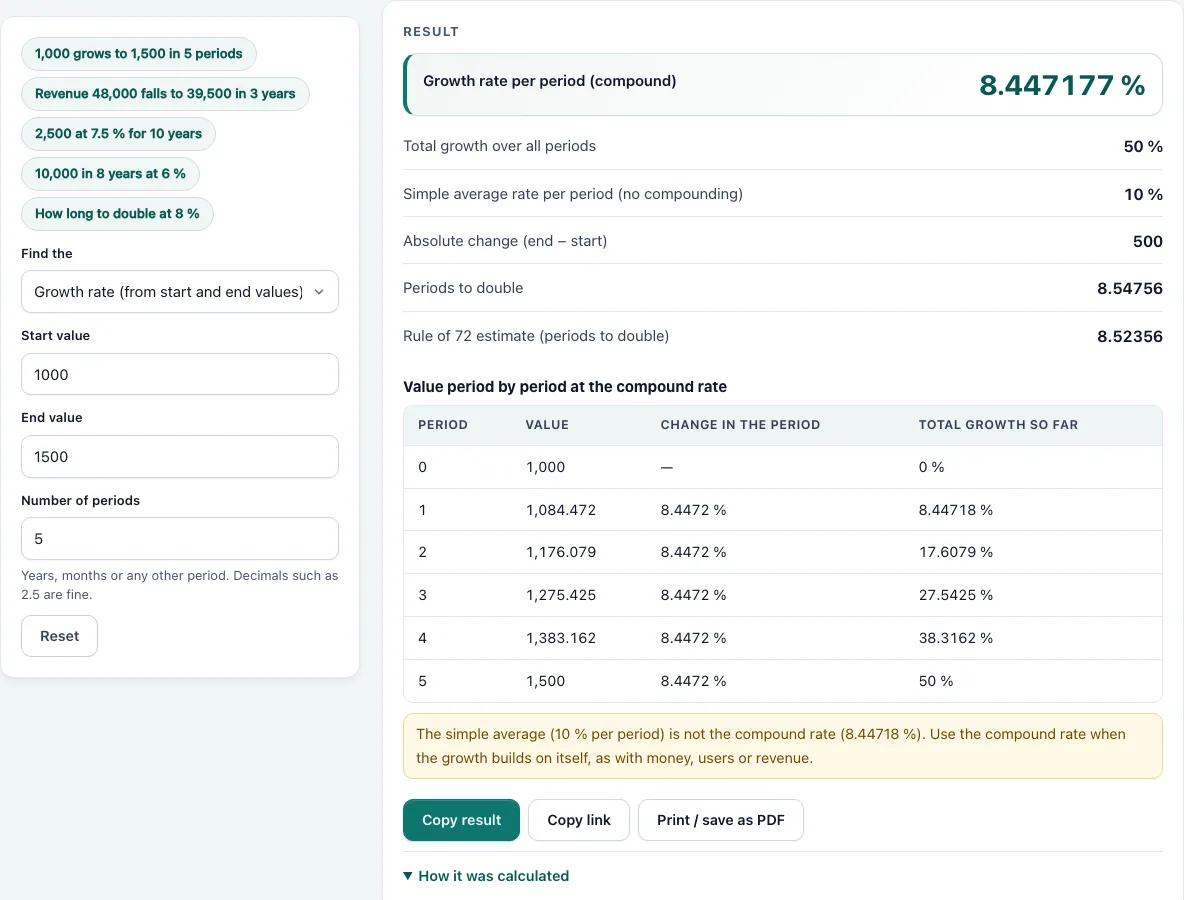
How to use the growth rate calculator
- Open the “Find the” menu and choose what you want: Growth rate, End value, Start value or Number of periods. To try an example first, click one of the preset chips.
- For Growth rate, type the Start value and the End value.
- For End value, type the Start value, the Growth rate per period (%) and the Number of periods.
- For Start value, type the End value, the Growth rate per period (%) and the Number of periods.
- For Number of periods, type the Start value, the target End value and the Growth rate per period (%).
- Only the fields needed for your choice are shown. Start and end values must be greater than zero. Periods must be greater than zero, and decimals such as 2.5 are fine.
- The rate can be negative and can be typed with or without a % sign, but it must be above −100 %.
- Read the result. Below it, a numbered list shows the working, and a warning appears if an input is unusual.
- Scroll to the table to see the value in each period at the compound rate, with the change in each period and the total growth so far. The table covers up to 50 periods.
Use Copy link to store your inputs in the page address so you or someone else can open the same calculation. Use Print / save as PDF to print the result, or Copy result to copy the result lines.
What is the formula for growth rate?
The compound growth rate per period is (end ÷ start)^(1 ÷ periods) − 1. Multiply the answer by 100 to get a percentage. The simple (total) growth rate is (end − start) ÷ start × 100 %.
For example, a value that grows from 1,000 to 1,500 over 5 periods has a total growth of 50 %. The compound rate per period is 1.5^(1 ÷ 5) − 1, which is 8.447177 % per period. Check it by multiplying 1,000 by 1.08447 five times, and you get about 1,500.
The same rule can be rearranged to find the other values. End value = start × (1 + rate)^periods. Start value = end ÷ (1 + rate)^periods.
What is the difference between simple and compound growth rate?
A simple growth rate divides the total change by the start value, with no compounding. A compound growth rate per period is the single constant rate that, applied in every period, turns the start value into the end value. Compound growth is the rate you need when each period grows on the previous period’s result.
Using the same example, 1,000 to 1,500 over 5 periods gives a simple average of 10 % per period (50 % ÷ 5). That number is not the compound rate. If you grew 1,000 by 10 % five times, you would reach about 1,611, not 1,500. The compound rate of 8.447177 % per period is the rate that reaches exactly 1,500. This is why the simple average should not be used as a growth rate when there is more than one period.
When the period is a year, the compound growth rate is called the CAGR (compound annual growth rate). A period can be a year, a month or any other unit, and the rate is always per that unit, so a rate per month is not comparable with a rate per year. Keep the unit the same for the start value, the end value and the number of periods.
Worked examples
| Input | Result |
|---|---|
| 1000 to 1500 in 5 periods | 8.44718 % per period, 50 % in total |
| 48000 to 39500 in 3 periods | -6.29014 % per period, -17.7083 % in total |
| start 2500, rate 7.5 %, 10 periods | end value 5,152.579 |
| end 10000, rate 6 %, 8 periods | start value 6,274.124 |
| 1000 to 2000 at 8 % per period | 9.00647 periods |
Calculated by the tool above with these values.
Frequently asked questions
How do you calculate the percentage growth rate?
Subtract the start value from the end value, divide by the start value and multiply by 100. For 1,000 to 1,500 this is 500 ÷ 1,000 × 100 = 50 %. To get a rate per period, use the compound formula in the section above.
How do I find the end value, start value or number of periods?
Use the Find the menu and pick the option you need. The formulas are end value = start × (1 + rate)^periods, start value = end ÷ (1 + rate)^periods and periods = ln(end ÷ start) ÷ ln(1 + rate). For example, 2,500 at 7.5 % for 10 periods grows to 5,152.579, and 10,000 reached after 8 periods at 6 % needs a start value of 6,274.124.
How long does it take to double at a given growth rate?
Divide ln 2 by ln(1 + rate). This works only when the rate is positive. Doubling money at 8 % per period takes 9.00647 periods. The rule of 72 gives a quick estimate by dividing 72 by the rate in percent, which gives 72 ÷ 8 = 9 periods.
Can a growth rate be negative?
Yes. A negative rate means the value falls. Revenue that drops from 48,000 to 39,500 over 3 years has a total change of −17.7083 % and a compound rate of −6.29014 % per year. The tool shows a warning that the growth rate is negative. The rate must stay above −100 %, because a rate of −100 % or lower would take the value to zero or below.
Why does the calculator show a warning or an error?
Warnings appear for unusual inputs. When you find the growth rate over more than one period, a warning reminds you that the simple average is not the compound rate. It also appears when the span is shorter than one period, which makes the annualised rate swing widely, and when the rate is 100 % or more per period.
Errors appear when the start or end value is zero or negative, when the rate is −100 % or below, when the rate is 0 % while finding periods (the value never changes), or when the sign of the rate moves the value away from the target.
Related tools
- Weighted mean calculator: use it when each value in an average has a different weight.
- Mean, median and mode calculator: use it to find the typical value in a list of numbers.
- Linear regression calculator: use it to fit a straight-line trend through data points.
- Standard deviation calculator: use it to measure how spread out your values are.
- Statistics calculator: use it when you need several basic statistics for the same data set.