F Table (F Distribution Critical Values)
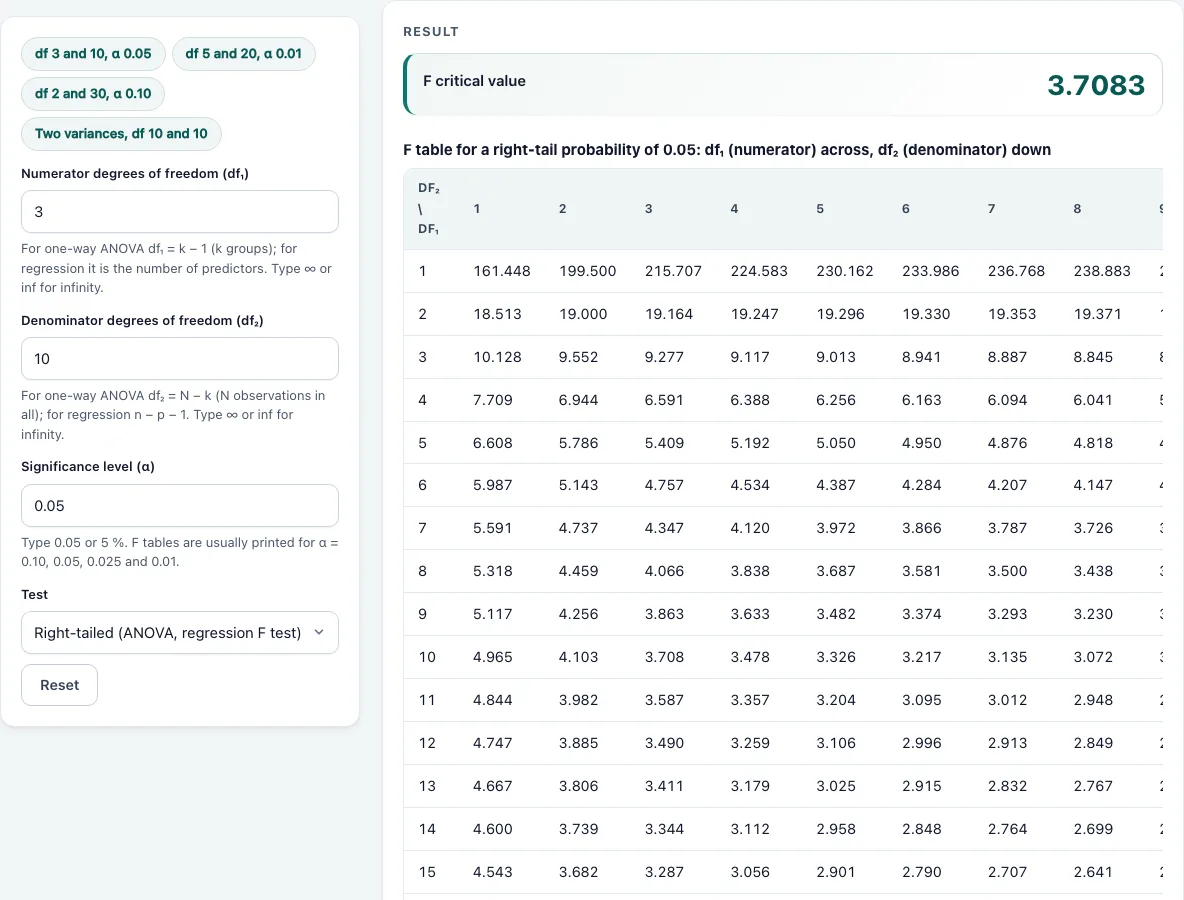
Enter the numerator and denominator degrees of freedom and α to get the F critical value, with the full F table for that α underneath.
Recent
Your last 10 settings, saved only in this browser. Nothing is uploaded.
How to use the F table
- Enter the numerator degrees of freedom, df₁. Use a number of at least 1, or type ∞ or inf for infinity.
- Enter the denominator degrees of freedom, df₂, using the same rules.
- Enter the significance level α as 0.05 or as 5%. Any value between 0 and 1 works, not only the four levels that printed tables use.
- Open the Test menu and choose Right-tailed (ANOVA, regression F test) or Two-tailed (comparing two variances).
- Read the result. The F critical value F(α; df₁, df₂) is shown with P(F ≥ F_crit) = α. In two-tailed mode you get both a lower and an upper critical value.
- Read the numbered list of steps below the result to see how the value was worked out. If an input is unusual, a warning is shown with the result.
- Scroll below the calculator to see the full F table for the right-tail probability you are using. It updates when you change α, and in two-tailed mode it shows the table for α ÷ 2, the probability in each tail.
Preset chips above the form load a ready example, which is a quick way to see how the inputs and output fit together. Copy link stores your inputs in the page address so you can share the same calculation. Print / save as PDF prints the result.
How do you read an F table?
An F table gives the value F(α; df₁, df₂) so that the probability of an F statistic at or above that value is α. Find the column for df₁ (the numerator degrees of freedom) across the top and the row for df₂ (the denominator) down the side. The number where they meet is the critical value. The tool’s table lists df₁ as 1–10, 12, 15, 20, 24, 30, 40, 60, 120 and ∞, and df₂ as 1–30, 40, 60, 120 and ∞, with three decimals.
The decision rule is simple. Reject the null hypothesis when your F statistic is larger than the critical value. For example, with df₁ = 3, df₂ = 10 and α = 0.05, the critical value is 3.7083 (3.708 in a printed table). An F statistic of 4.2 is larger, so you reject. An F statistic of 3.5 is smaller, so you do not.
What are df1 and df2 in the F table?
df₁ is the numerator degrees of freedom and df₂ is the denominator degrees of freedom. The order matters: swapping them gives a different critical value, so always check which is which.
For a one-way ANOVA with k groups and N total observations, df₁ = k − 1 and df₂ = N − k. For a regression F test, df₁ is the number of predictors and df₂ is n − p − 1, where n is the sample size and p is the number of predictors. Here p is the same count as df₁, so df₂ = n − df₁ − 1.
Degrees of freedom are whole numbers in the table, so enter the count from your own design or model. The tool needs these two values to find the correct row and column, and it gives you the exact value even when your numbers do not appear in a printed table.
Worked examples
| Input | Result |
|---|---|
| df₁ 3, df₂ 10, α 0.05, Right-tailed (ANOVA, regression F test) | F = 3.7083 |
| df₁ 5, df₂ 20, α 0.01, Right-tailed (ANOVA, regression F test) | F = 4.1027 |
| df₁ 2, df₂ 30, α 0.1, Right-tailed (ANOVA, regression F test) | F = 2.4887 |
| df₁ 4, df₂ 45, α 0.05, Right-tailed (ANOVA, regression F test) | F = 2.5787 |
| df₁ 10, df₂ 10, α 0.05, Two-tailed (comparing two variances) | F = 0.26905 and 3.7168 |
Calculated by the tool above with these values.
Frequently asked questions
What if my degrees of freedom are not in the table?
The tool gives the exact critical value and also the value a printed table would give. The printed value uses the next listed df below yours, so it is slightly larger and more conservative. For df₁ = 4, df₂ = 45 and α = 0.05, the exact value is 2.5787, and the printed table row 40 gives 2.606.
How do I get the lower critical value for a two-tailed F test?
In two-tailed mode, α is split into α/2 in each tail, and the tool shows both critical values. The lower value is the reciprocal of the upper value with the degrees of freedom swapped: F(1 − α; df₁, df₂) = 1 ÷ F(α; df₂, df₁). For df₁ = df₂ = 10 and α = 0.05, the two values are 0.26905 and 3.7168.
Why does the table change when I change α?
Each F table shows the right-tail probability for one α, so a different α gives different critical values. Printed tables usually exist for α = 0.10, 0.05, 0.025 and 0.01. Choose the α your study or course specifies before you read the table.
Can I use infinity for degrees of freedom?
Yes. Type ∞ or inf. As df₂ goes to infinity, the critical value becomes χ²(α; df₁) ÷ df₁. As df₁ goes to infinity, it becomes df₂ ÷ χ²(1 − α; df₂). If both are infinite, the critical value is 1.
How large can a critical value be with small degrees of freedom?
With df₁ = df₂ = 1 and α = 0.05, the critical value is 161.448. Small denominator degrees of freedom produce very large cutoffs, so an F statistic must be big before you reject.
Do the values match standard statistical software?
Yes. The values match the F table in the NIST/SEMATECH e-Handbook of Statistical Methods and the output of scipy.stats.f.isf. For example, df₁ = 5, df₂ = 20 and α = 0.01 gives 4.1027 here, which is 4.103 in a three-decimal table.
Related tools
- One-way ANOVA calculator: Use it to compute the F statistic that you compare with the critical value from this table.
- Two-way ANOVA calculator: Use it when your data has two factors and you need separate F tests for each.
- Critical value calculator: Use it when you also need z, t or chi-square critical values and the rejection region.
- P-value calculator: Use it when you want the probability of your observed statistic rather than a cutoff.
- T table: Use it for critical values of t tests.
- Multiple regression calculator: Use it to fit a model and find the degrees of freedom for a regression F test.
- Chi-square test calculator: Use it for tests based on the chi-square distribution.